Aviamasters app: is there one, and how to play on a phone
There is no standalone Aviamasters app from BGaming. The game is built for mobile and runs in your phone's browser, either as the free demo on bgaming.com or inside a casino that offers it. The "Aviamasters app" and APK downloads you find in search results come from third parties, and at least one of them is not a casino game at all.
You can have the same game and a one-tap icon on your home screen without installing a thing.
Real-money play: 19+ in Ontario, 18+ in Alberta.
Is there an official Aviamasters app?
No. BGaming's own game page lists browser play: the demo on bgaming.com and the full game at partner casinos. It does not list an Aviamasters app for the App Store or Google Play, and BGaming sells its games to casinos rather than to players directly.
Think about where an app promising "the real Aviamasters" gets the game. Either it is a casino's own app with BGaming games inside, which is fine, or it is a copy, a wrapper around a website, or something unrelated borrowing a popular name. The name on the icon tells you nothing.
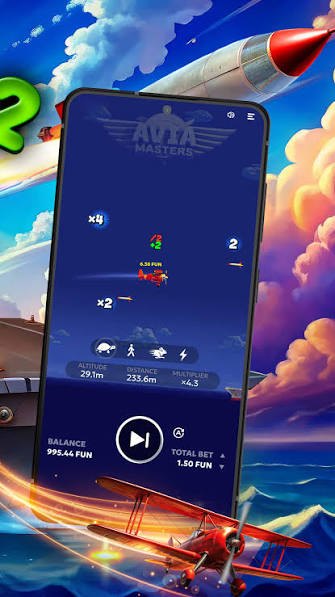
Is the Aviamasters APK safe?
An APK from a random site is the riskiest way to reach this game. To install it, Android makes you allow installs from unknown sources, which switches off a layer of protection for your whole phone, and you then trust an unknown developer with your device and possibly your casino login.
The listings themselves prove the point. On Uptodown, an app titled "Aviamasters" with the package name aviamasters.astronaut.app turns out to be a collection of Arabic proverbs by an unrelated developer. Other APK pages call themselves "official" while BGaming lists no app at all.
| What you see | What it usually means | What to do |
|---|---|---|
| "Official Aviamasters APK" | BGaming lists no app, so the claim is false. | Close the page. |
| Asks you to allow unknown sources | The file is outside Google Play's checks. | Do not change the setting for a game you can play in the browser. |
| Asks for your casino login inside the app | A common way to steal accounts and balances. | Only log in on the casino's own site or its store app. |
| A "predictor" or "signals" app | No tool can see a result the game has not drawn yet. | Treat it as a scam, especially if it wants payment. |
| Store listing named Aviamasters from an unknown developer | Often unrelated to BGaming, like the proverbs app above. | Check the developer name before installing anything. |
If you already installed an APK and entered casino details in it, change your casino password now, turn on two-step login if the casino offers it, and check your transaction history.
How to play Aviamasters on an iPhone
On an iPhone you play in Safari or any other browser. There is nothing to download, and the game adapts to the screen on its own.
- Open the casino site in Safari. Use our partner link or type the address of a casino that accepts your province.
- Log in or register. Registration happens on the casino's site, not in any Aviamasters app.
- Search the lobby for Aviamasters. Check that BGaming shows as the provider on the tile or loading screen.
- Choose real money or demo. Set your stake with the arrows next to "Total bet" and press play.
- Turn the phone sideways if you like. Landscape gives a wider view of the flight and the carrier.
How to play Aviamasters on Android
On Android the steps are almost identical, and you keep the phone's download protection switched on. Chrome, Firefox or Samsung Internet all work.
- Open the casino site in your browser. Do not download an APK; the browser version is the same game.
- Log in on the casino's page. Check the address bar shows the casino's real domain before you type a password.
- Find Aviamasters in the lobby. Tap the tile and wait for the BGaming loading screen.
- Set stake and speed. The 4 speed icons and the autoplay button sit in the bottom panel, the same as on a computer.
How to add the game to your home screen
A home-screen shortcut gives you the one-tap start that people look for in an app, without any of the APK risks. It simply opens the casino page in your browser.
iPhone (Safari)
- Open the casino lobby page.
- Tap the Share button.
- Choose "Add to Home Screen", then "Add".
Android (Chrome)
- Open the casino lobby page.
- Tap the three-dot menu.
- Choose "Add to Home screen" or "Install app".
The icon then sits next to your other apps. Tap it, log in if asked, and Aviamasters is two taps away. Long-press it to delete it, same as any other icon.
What about casino apps in the app stores?
Some licensed casinos publish their own apps in the App Store or Google Play, and those apps may include Aviamasters in their lobby. That is a different thing from an "Aviamasters app". The app belongs to the casino, and the game inside it comes from BGaming.
Before you install one, check two things. First, the developer name in the store listing should match the casino company. Second, in Ontario the casino should be on the iGaming Ontario list, and in Alberta it should be registered with the AGLC. A real money app that fails either check is not worth the risk.
Speed and autoplay on a small screen
Phones make fast play easy, which is exactly why the 4 speed settings and autoplay deserve a minute of setup before the first real round. The game works the same as on a laptop, but a thumb on a play button is quicker than a mouse.
A sensible phone setup looks like this. Keep the default walking-person speed for your first 50 rounds, so you can still follow what each rocket and multiplier does. When you switch to autoplay, set it to 50 rounds, add a loss stop of about 10% of your balance, and add a win stop at around 50 times your stake. With a 40 CAD balance and a 0.20 CAD stake, that means stopping after a 4 CAD loss or a single 10 CAD landing.
Speed does not change the published 97% RTP, but lightning speed on a phone can run through 100 rounds while you wait for a bus. More rounds means more total stake, and the 3% edge applies to all of it.
Phone settings that protect your budget
Your phone already has tools that work well alongside casino limits. They take five minutes to set and they do not depend on willpower in the moment.
- Set a deposit limit in the casino account first. A weekly cap of, say, 50 CAD is easy to plan around and hard to break on impulse.
- Turn on a screen-time limit for the browser shortcut. iPhone Screen Time and Android Digital Wellbeing can both limit a site or app to, for example, 30 minutes a day.
- Switch off casino push notifications. Offers that arrive at 11 pm are designed to be tapped at 11 pm.
- Keep payment details out of autofill for the casino site. One extra step before each deposit gives you a moment to reconsider.
If you need a longer break, every regulated casino offers self-exclusion, and ConnexOntario and PlaySmart can help with the next step.
Aviamasters 2 on your phone
The sequel works the same way: no app, just the browser. BGaming added a customizable spin button to Aviamasters 2, so you can move and resize the play button to suit one-handed use on a phone.
The "Activate bonus" button for Safe Landing sits next to the speed icons, close to the play button. On a small screen it is easy to tap by mistake, and each Safe Landing round costs 50x your bet. Check the stake shown before every round if you play the sequel on a phone. Our Aviamasters 2 comparison explains what the feature costs.
Aviamasters login problems
There is no Aviamasters account to log in to. You log in to the casino, and the casino opens the game. If a page asks you to "log in to Aviamasters" with a separate username, it is not a real BGaming product.
If the casino will not let you in on your phone, clear the browser cache for that site and update the browser. Still stuck? Use the casino's password reset. And never read out or forward a login code you received by text, even to someone who says they are support; real support never asks for it.
Phone and app questions
Can I download Aviamasters for free?
You do not need to download it. The free demo runs in your phone's browser on bgaming.com, and the full game runs in the browser at casinos that offer it.
Does Aviamasters work on iPhone?
Yes. It runs in Safari and other iPhone browsers, in portrait or landscape.
Is there an Aviamasters real money app?
Not from BGaming. Some casinos have their own apps that include the game; check the developer and the casino's licence before installing.
Do Aviamasters predictor apps work?
No. Results are drawn by the game when the round starts, so no app can show them in advance.
Is the mobile version different from desktop?
No. It is the same game with the same 97% RTP; only the layout adapts to the screen.
No download, no unknown sources, no risk to your phone: open the game in your browser and add it to your home screen. The partner casino adds 500% to your first deposit, with its terms on the offer page.
Play Aviamasters on your phone nowFirst time? Try the free Aviamasters demo on your phone, or check whether Aviamasters is legal where you live.